
Premium content authoring, video production, editing, SCORM, xAPI, and reporting in one workspace
Build better security training
from one prompt.
Content Studio by Jericho helps security, L&D, and compliance teams turn a topic, policy, or training need into reviewable course and video drafts, then package approved work for supported export workflows.
Start hereWhat do you need employees to practice next?
e.g. MFA fatigue, QR phishing, AI data safety…GenerateNo credit card required. Generate your first course from one awareness topic, then review the draft, supporting media, and configured export path.Works withSCORMxAPILitmosHTMLPDFBrand kits
5-minute lessons with a consistent instructional rhythm✓ Free plan✓ No credit card✓ SCORM & xAPI export✓ Expert support available✓ Demo with Matt available
Supports SCORM and configured LMS workflowsSCORM 1.2SCORM 2004xAPI / Tin CanHTMLPDF
Product range
One workspace across the awareness program.
What you can make today
Not ready to build a course yet?
Start with the Security Awareness Resources gallery. Sign up, grab a practical one-pager or infographic, then use it as the seed for your first Content Studio by Jericho course.
One studio, every medium
Reviewable drafts and supporting media in the same place.
No stitching together five tools. Brief it once and Content Studio by Jericho prepares reviewable drafts, supporting media, and versioned workspace assets where configured.
AI Video
Turn a script or a still into a course-ready clip for explainers, scenarios, and intros.
Voice & narration
Create lifelike narration from text, or use an approved voice so modules sound consistent.
Image & stock
Generate on-brand illustrations from a prompt, or pull a free Pexels photo without leaving the editor.
Translate & dub
Localize a finished course — script and audio — so one build ships to every region you train.
Brand kits
Lock logo, palette, tone, and approved phrasing per workspace so every generation stays on-brand.
LMS export
Package courses for the systems teams already use, with formats built for training delivery and reporting.
Product proof
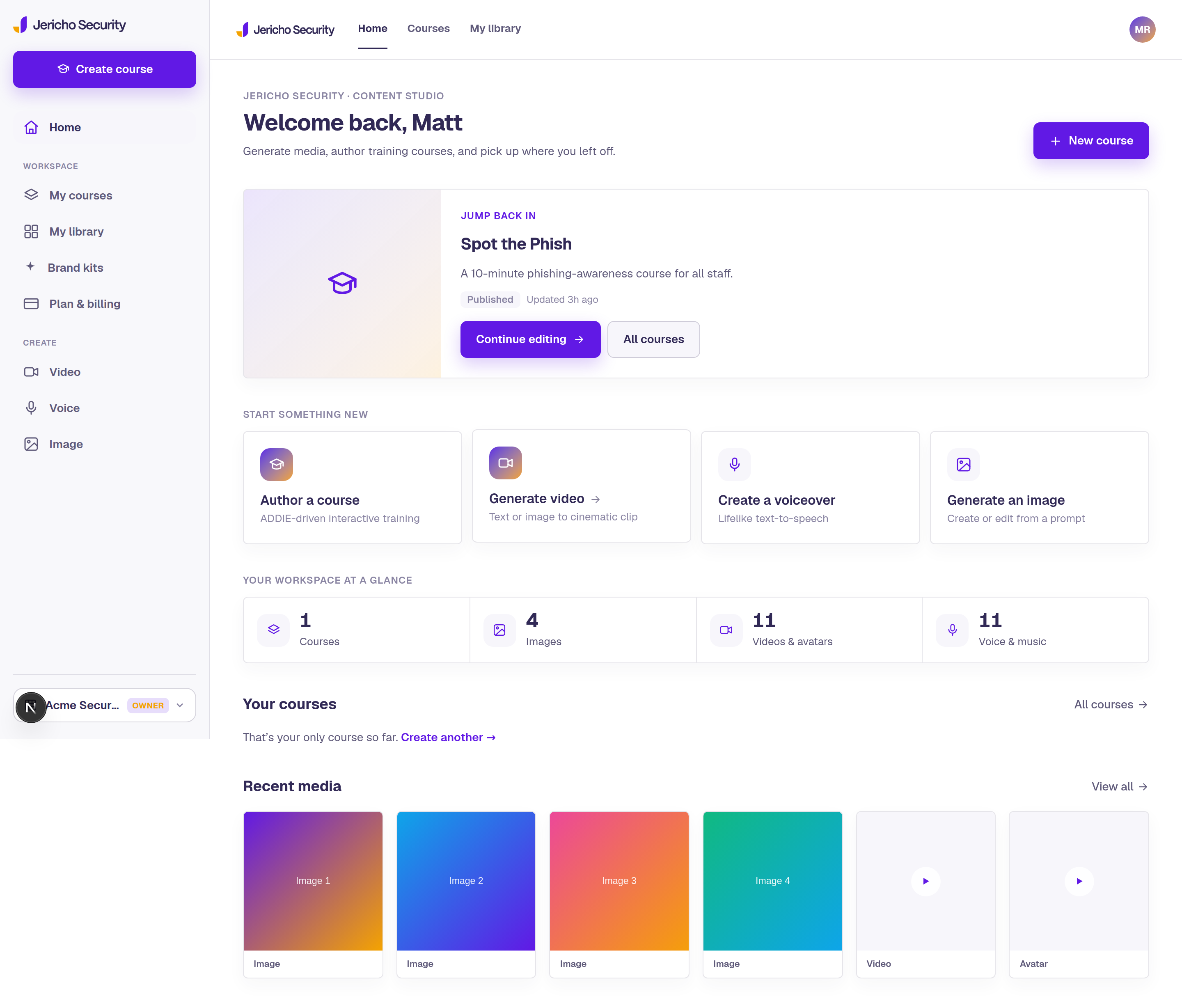
See the studio your team will actually use.
Content Studio by Jericho is not a phishing platform with a course builder bolted on, and it is not a content library dressed up as AI. It gives your team a workspace for measuring training topics, drafting targeted training, managing media, previewing the learner experience, and getting remediation ready for the LMS or messaging workflows.
Manage the work
Track courses, assets, and team production from one dashboard.
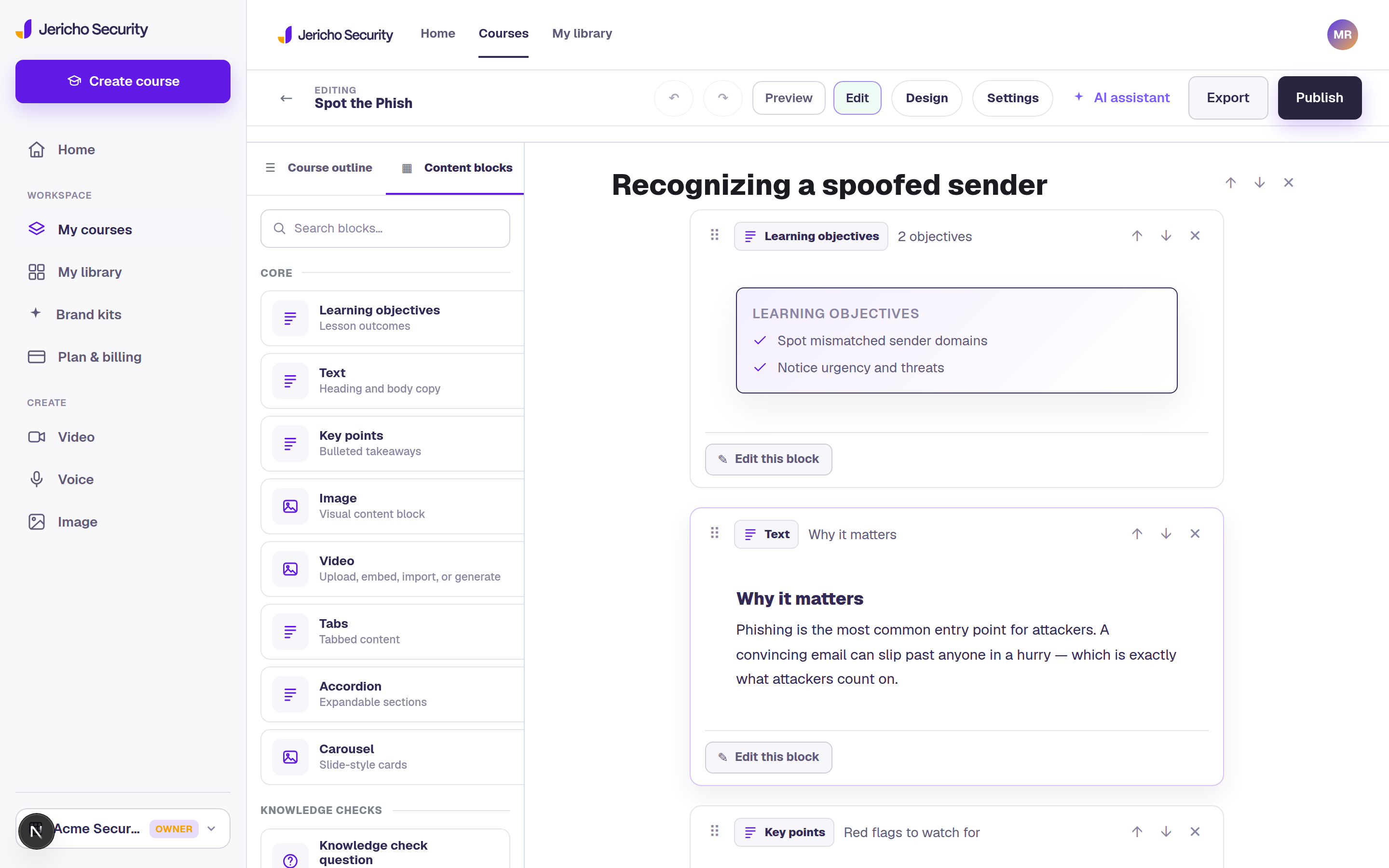
Build the course
Draft lessons, add interactions, and assemble awareness content in the editor.
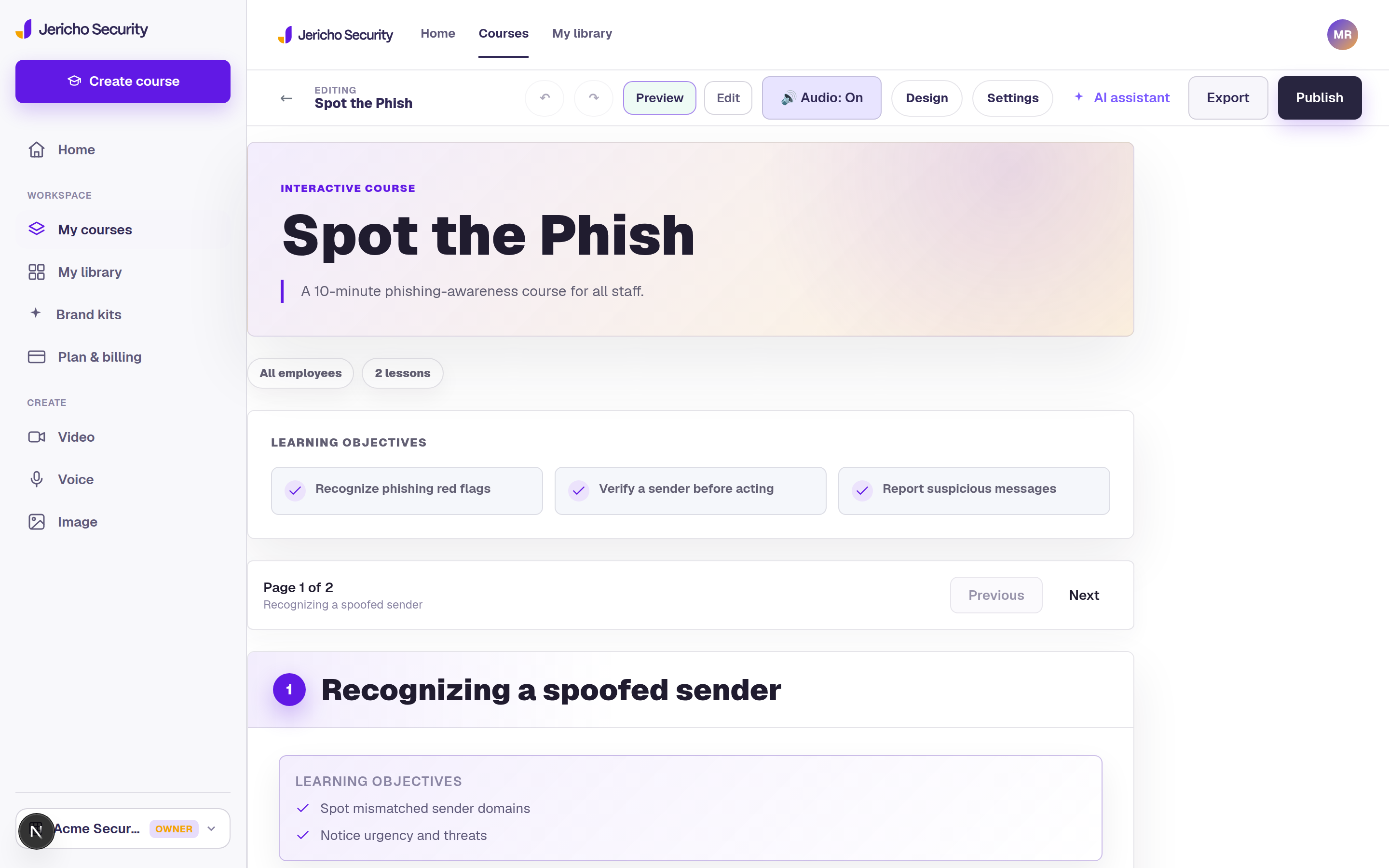
Preview the learner view
Review the employee experience before assigning or exporting training.
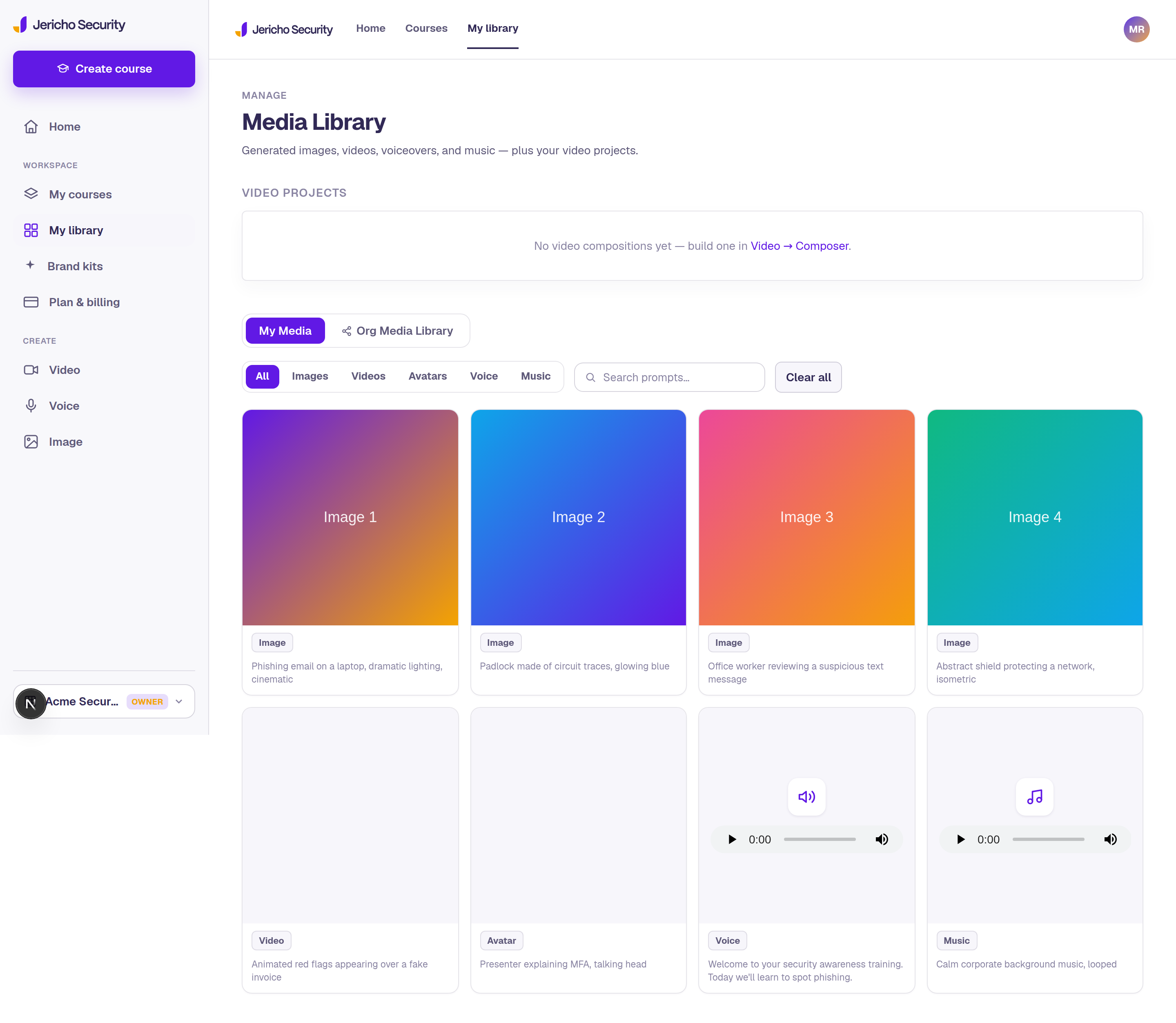
Keep media organized
Manage generated video, voiceover, images, and course assets in one library.
Ready to test the real workflow?Start the Free plan after the screenshots, not after a scavenger hunt.
No credit card required. Bring one awareness topic and leave with a first draft, supporting media, and export path. Prefer a walkthrough first? Schedule time with Matt to talk through Content Studio by Jericho and see a demo.
Authoring, not just assets
A real eLearning authoring tool — built for premium learning experiences.
- 5-minute lessons — 5 minutes creates 1 lesson, 10 creates 2, up to a 120-minute course with 24 lessons.
- Learning objectives appear once — Lesson 1 sets objectives, then every lesson follows Hero image → text → text → image → interaction → knowledge check.
- Phishing, Smishing, and Vishing simulations — email, text-message, and voice-call practice blocks with realistic workplace details.
- Vishing caller voice — pick a separate ElevenLabs caller voice for voice simulations when the caller should not sound like the course narrator.
- ADDIE-driven generation — start from a topic or upload a policy doc; get objectives, lessons, practice, and checks.
- Export where configured — SCORM 1.2/2004, xAPI, standalone HTML, or PDF workflows for supported LMS/reporting paths.
Platform plus people
We do not just assign training. We partner with you to improve the program.
Off-the-shelf training has a place when teams need to move quickly. Jericho bridges the gap between generic content and fully custom development by helping customers understand training topics, create targeted remediation fast, and bring in cybersecurity and instructional design experts when Content Studio by Jericho alone is not enough.
Plan what matters
Use training topics, policy updates, current threats, and reporting patterns to identify where learners may need support.
Respond with relevance
Create personalized courses, videos, simulations, and messages tied to the topic, not just the calendar.
Deliver where it fits
Use traditional LMS export paths or messaging workflows when timely, approval-gated reinforcement matters.
Bring experts when needed
Jericho instructional designers and cybersecurity experts can help build custom training quickly when the stakes require more than software.
Customer partnership note: Jericho is not just another phishing platform or content creation tool. We care about cybersecurity, customer experience, and helping teams make a positive impact on their cybersecurity posture.
From idea to published training
Four steps from a training topic to polished course or video output.
Start from the topic
Use a training signal, training need, policy update, or current threat to define the support learners need.
Create the asset
Draft a course, video, simulation, quiz, message, or job aid with SAM and your approved context.
Review before delivery
Preview the learner experience, confirm tone and accuracy, and keep delivery approval-gated.
Deliver and learn
Export to SCORM, xAPI, HTML, or PDF, or prepare messaging-based reinforcement when the timing matters.
Pricing
Simple plans for solo creators to whole teams.
Start free with 1 user, 1 workspace, and 1 course generation. Upgrade when you are ready for unlimited course generation, video/voice generation, more workspaces, team collaboration, and full Jericho Library access. Paid plans are monthly, with annual billing available at a discount.
Do I need a credit card?
No. Start the Free plan without adding payment details.
What can I build on the Free plan?
Bring one awareness topic and generate a first course draft, supporting media, and export package using included credits.
Can I export to my LMS?
Yes. Content Studio by Jericho supports SCORM, xAPI, HTML, and PDF export workflows.
Does it automatically message learners?
No. Messaging and assignment workflows stay approval-gated.
$0 /mo
Try Content Studio by Jericho and generate your first cybersecurity course.
- 1 user / 1 workspace
- 1 course generation
- No video or voice generation
- 1 Jericho Library use per month
$49 /mo
For individuals creating cybersecurity training fast.
- 1 user / 1 workspace
- Unlimited course generation
- 10 video/voice generations per month
- 10 Jericho Library uses per month
$99 /mo
For security, L&D, and GRC teams building repeatable training workflows.
- 1 user / 3 workspaces
- Unlimited course generation
- 25 video/voice generations per month
- Unlimited Jericho Library access
$399 /mo
Same as Pro, with room for a working team.
- 5 users / 5 workspaces
- Unlimited course generation
- 100 video/voice generations per month
- Unlimited Jericho Library access
Contact us
Custom users, workspaces, generation volume, SSO, procurement support, and onboarding.
- Custom users and workspaces
- SSO / advanced admin options
- Unlimited Jericho Library access
- Custom limits and support
Start free — no credit card
Start free. Upgrade when the workflow proves itself.
Use the Free plan to generate your first cybersecurity course. Upgrade to Starter, Pro, or Team when you need unlimited course generation, video/voice generation, more workspaces, collaboration, and full Jericho Library access. No credit card required to start.